What makes a good dialog editor for voice?
Exploring the design choices that make dialog iteration faster, clearer, and more pleasant for creators
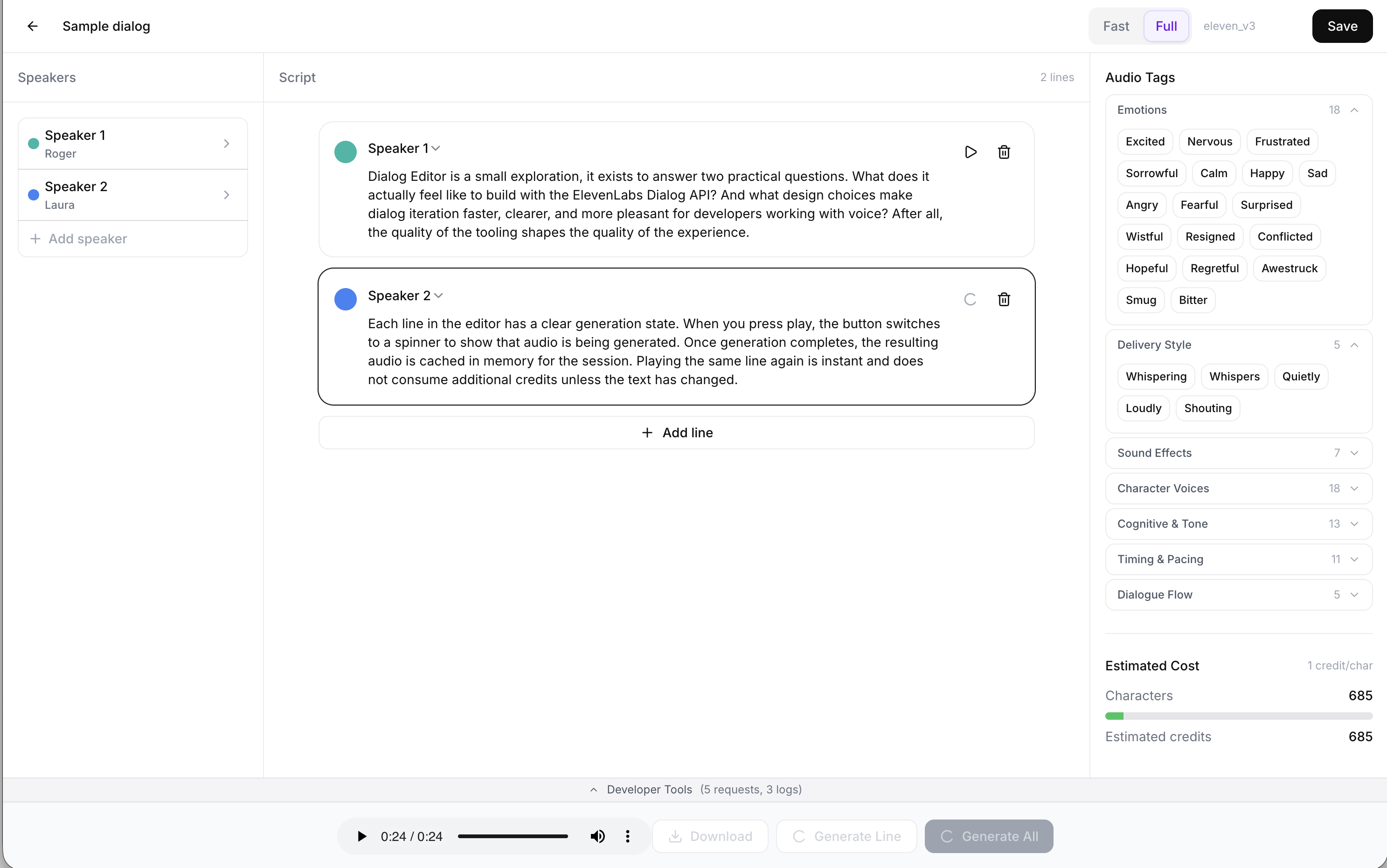
Dialog Editor is a small exploration, it exists to answer two practical questions. What does it actually feel like to build with the ElevenLabs Dialog API? And what design choices make dialog iteration faster, clearer, and more pleasant for creators working with voice? After all, the quality of the tooling shapes the quality of the experience.
Voice generation needs visible feedback
Voice does not behave like text, that is true on a conceptual level, sure, but in this case it is very literal in that generating audio takes time, to make sure the person using it isn’t left wondering if its broken of working as intended, its important to provide clear feedback about what is happening.
Each line in the editor has a clear generation state. When you press play, the button switches to a spinner to show that audio is being generated. Once generation completes, the resulting audio is cached in memory for the session. Playing the same line again is instant and does not consume additional credits unless the text has changed.
This simple loop makes iteration feel fluid. You can adjust wording, pacing, or punctuation and immediately hear the result without waiting or repeating unnecessary requests.
Make the speed and quality tradeoff explicit
To keep in the flow, and perhaps to spare some of those credits, it can be useful to use different models for different tasks. Want to flesh out the body of the dialog first and quickly get a sense of how the lines sound when they’re spoken? Use the Flash models (eleven_flash_v2.5+) to get audio fast, and at half the cost of the full model.
Once that scaffolding is done, refine the delivery by switching to Full mode which uses (eleven_v3+) to get audio, complete with audio tags, high quality expressive speech; Allowing fine control over emphasis, timing, and emotion directly in the script.
Keep up with the latest models automatically
In this word models get released faster then you can shake a stick at them. The SDK comes with a useful method to list all available models:
const models = await client.models.list();You can then filter this list and match against the model base name that you want to use, like “eleven_flash_” and “eleven_v” in this app and never go out of style.
Learning the API by watching it work
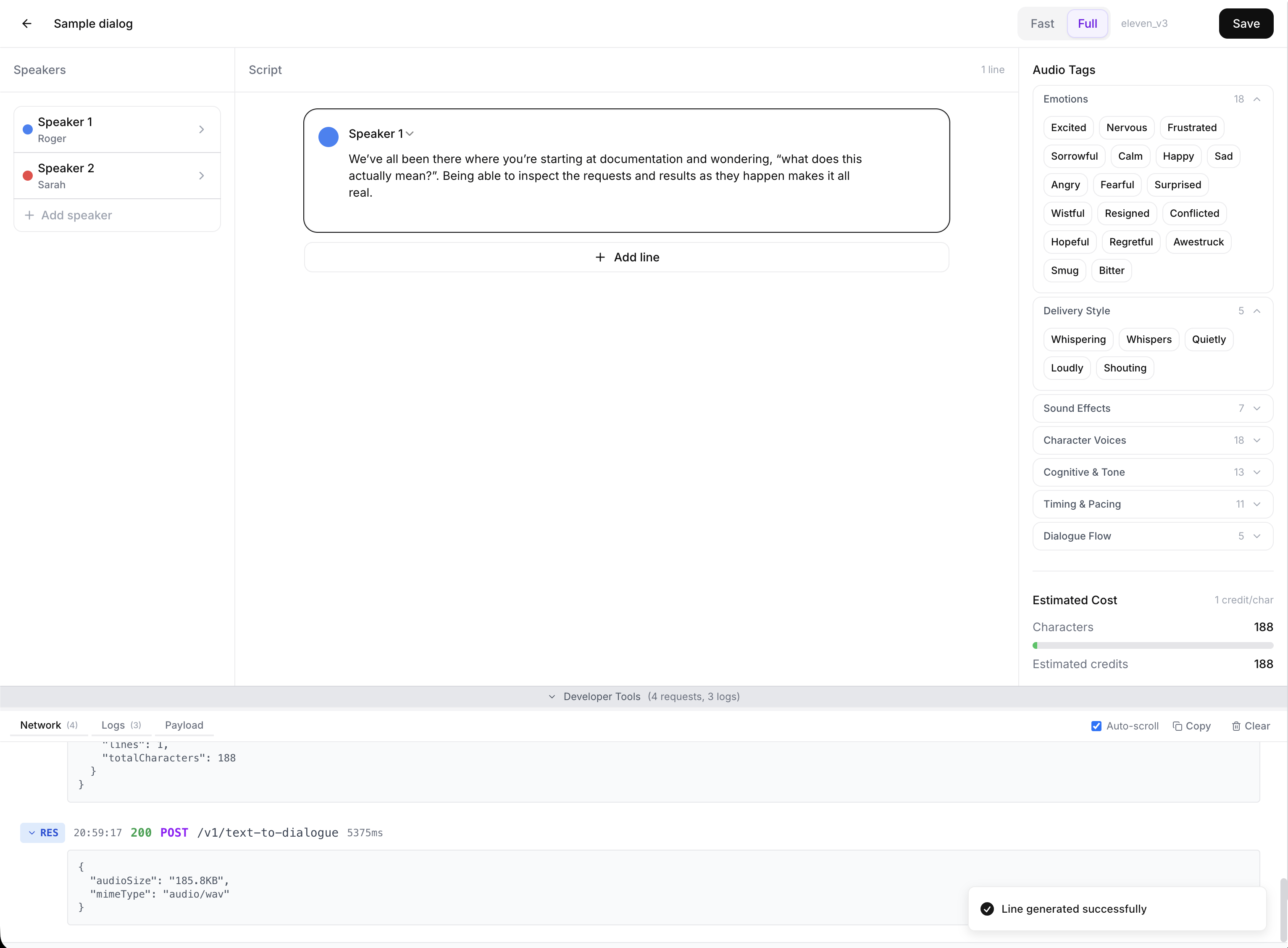
We’ve all been there where you’re staring at documentation and wondering, “what does this actually mean?”. Being able to inspect the requests and results as they happen makes it all real.
Dialog Editor includes an in-app developer tools drawer that exposes the full interaction with the ElevenLabs SDK. You can view debug logs as they are emitted, inspect raw requests and responses, and see the exact JSON payload generated for the dialog you are editing. This allows you as a developer to grok whats happening under the hood and how the API surface works, and discover features and fields you might not have known about otherwise.
What it takes to turn this into a production app
Dialog Editor is intentionally optimized for learning, making it easy to run and check under the hood to understand all the moving bits. Turning this into a production ready app would leep ElevenLabs SDK and the same UX principles, and build out the foundation to turn it into something users can rely on.
Start with key management. The demo uses a bring your own API key flow so anyone can run it locally. In production, keys should never live in the browser. You would introduce authenticated server endpoints, short-lived tokens, or a proxy service that signs requests and enforces quotas.
Next, move persistence to the server. In this demo, dialogs and sessions are stored locally using Zustand with the persist middleware and localStorage, which keeps setup friction near zero:
export const useDialogueStore = create(
  persist(
    (set, get) => ({
      dialogs: {},
      sessions: {},
      apiKey: undefined,
    }),
    { name: "dialog-editor" }
  )
);
That is ideal for exploration, but production needs user accounts, access control, and durable storage. The state layer becomes an API. Dialogs become rows, revisions become history, and collaboration becomes possible.
Then harden the audio workflow. The editor already caches generated audio for instant replay within a session. In production, you would extend this into a reusable asset pipeline: store audio clips, associate them with dialog revisions, invalidate them deterministically when inputs change, and surface cost and latency metrics so teams can tune the workflow.
Finally, preserve the developer experience. But you probably want to move all the logging to observability tools or log services for your preferred platform.
The project is open source and available here: https://github.com/chrischabot/dialog-editor
And you can try the live demo here: https://dialog-editor-three.vercel.app/